
Module 1: How Computers Represent Data
1.1 Binary, Bits, and Bytes: Why Computers Use Only Two Digits
What You Will Learn
By the end of this lesson you will be able to explain why computers use only ones and zeros, convert small decimal numbers into binary, and describe the difference between a bit and a byte. You will also understand why this matters when you buy a phone, save a document, or check your remaining data bundle.
Why Do Computers Use Binary?
A computer is made of millions of tiny electronic switches called transistors. Each switch can only be in one of two states: on or off, high voltage or low voltage. We represent these two states with the digits 1 (on) and 0 (off). This system is called binary, and it is the language that computers understand at their most basic level.
Imagine a light switch in your room in Kalomo. The bulb is either on or off; there is no halfway state. A computer works the same way. It does not understand English, Nyanja, or Bemba directly. It understands patterns of on and off signals. By grouping these signals, computers can represent numbers, letters, pictures, sounds, and even the videos you watch on your phone.
Bits and Bytes
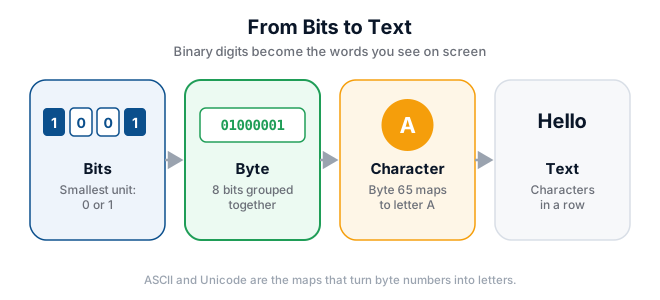
A single binary digit, either 1 or 0, is called a bit. It is the smallest piece of information a computer can store. On its own, one bit cannot do much. It can only answer a simple yes-or-no question, such as "Is the door locked?" or "Is this transaction complete?"
When we group eight bits together, we get a byte. One byte can represent 256 different values, which is enough to store one character of text, such as the letter "A" or the number "7". For example, the word "Zambia" needs six bytes because it has six letters.
Worked Example: Counting in Binary
In everyday life we use decimal numbers, which have ten digits: 0 to 9. In binary we only have two digits: 0 and 1. Here is how to count from zero to five in both systems:
| Decimal | Binary |
|---|---|
| 0 | 0 |
| 1 | 1 |
| 2 | 10 |
| 3 | 11 |
| 4 | 100 |
| 5 | 101 |
To convert the decimal number 5 into binary, think about which powers of two add up to 5. Four plus one equals five. The place values for three binary digits are 4, 2, and 1. So we put a 1 in the 4 place, a 0 in the 2 place, and a 1 in the 1 place, giving 101.
Why Binary Matters in Zambia
When you buy a smartphone in Lusaka or Kalomo, the seller may say it has "128 GB of storage" and "8 GB of RAM." GB stands for gigabyte, which means billions of bytes. Because everything is stored as binary, the actual usable space is often slightly less than the advertised number, but the principle is the same: more bytes means more space for apps, photos, music, and videos.
Your mobile money transaction also relies on binary. When you send K50 via Airtel Money or MTN MoMo, the network converts your request into binary signals, sends it through computers, and records the result. Without binary, none of this would work.
Try It Yourself
- Write down the decimal numbers 0 to 7 in one column.
- Convert each number to binary using the place values 4, 2, and 1.
- Check your answers by converting back to decimal.
- On your phone, open the settings and look at your storage size. How many GB do you have in total, and how many are free?
Key Terms
- Binary: A number system that uses only two digits, 0 and 1, matching the on and off states of computer circuits.
- Bit: A single binary digit, the smallest unit of data in a computer.
- Byte: A group of eight bits, enough to represent one character of text.
- Transistor: A tiny electronic switch inside a computer processor.
- Decimal: The everyday number system with ten digits from 0 to 9.
Summary
Computers use binary because their hardware is built from switches that are either on or off. A bit is one binary digit, and a byte is eight bits. By combining bytes, computers can represent numbers, text, images, sound, and transactions. Understanding binary helps you make sense of phone storage, data bundles, and the digital world around you.